
Introduction
The Ultimate Rank Math SEO Checklist (2026)
Getting traffic from Google is no longer about adding a few keywords to your pages. Modern SEO requires a complete strategy that includes technical SEO, on-page optimization, schema markup, internal linking, content quality, and user experience. If you miss even one important step, your website may struggle to rank.
This is where Rank Math SEO becomes one of the most valuable WordPress plugins available today. It simplifies complex SEO tasks into an easy-to-follow workflow, making professional SEO accessible to beginners while still offering advanced features for experienced users.
Whether you have a blog, business website, affiliate site, WooCommerce store, or portfolio, using the right SEO checklist can save time and help you avoid costly mistakes.
In this guide, you’ll find 50+ actionable Rank Math SEO tips that you can apply immediately. Instead of guessing what to optimize next, you’ll have a clear roadmap for improving your site’s visibility, search rankings, and long-term organic traffic.
By the end of this guide, you’ll know exactly how to use Rank Math more effectively and build a stronger SEO foundation for 2026 and beyond.
Use this complete Rank Math SEO Checklist to improve your website rankings with 50+ actionable SEO tips, settings, and best practices for 2026.
Why Trust This Checklist?
Many SEO checklists repeat basic advice without explaining what really matters. This guide is different.
It combines practical SEO experience with current best practices used by successful WordPress websites. Every recommendation focuses on actions that can genuinely improve your website instead of chasing outdated SEO tricks.
This checklist is designed for:
- Beginner bloggers
- Affiliate marketers
- Small business owners
- WooCommerce stores
- Digital agencies
- Content creators
- Anyone using WordPress with Rank Math
Instead of trying to optimize everything at once, you can work through each section one step at a time.
If you’re new to building websites, read our What Is Web Hosting? Complete Beginner’s Guide before optimizing your SEO.
What Is Rank Math?
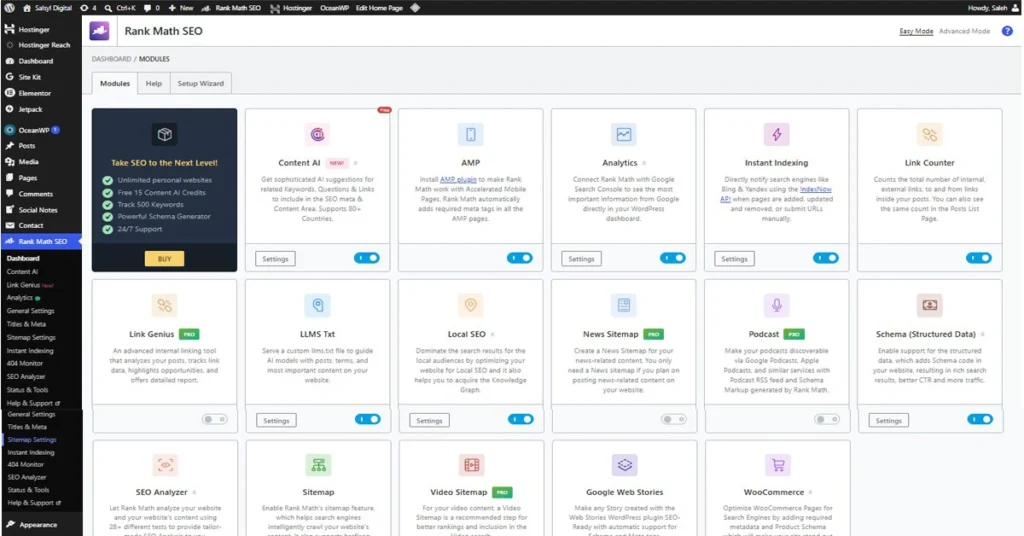
Rank Math is an all-in-one WordPress SEO plugin designed to help website owners optimize their content for search engines without needing advanced technical knowledge.
Unlike many traditional SEO plugins, Rank Math includes numerous premium-level features inside its free version. These include Schema Markup, XML Sitemaps, 404 Monitoring, Redirect Management, Image SEO options, Local SEO settings, WooCommerce SEO support, and AI-powered content assistance.
Its clean interface and guided setup wizard make it easy to configure your website correctly from the beginning.
Today, millions of WordPress users rely on Rank Math because it simplifies SEO and provides powerful optimization tools that are typically spread across multiple plugins.
Read the official Rank Math documentation for advanced configuration.
Why Use Rank Math for SEO?
While there are various SEO plugins available, Rank Math is exceptional due to its combination of powerful features and an intuitive user interface.
Some of its biggest advantages include:
Easy Setup Wizard
The installation wizard automatically detects your website type and recommends SEO settings, helping beginners avoid common configuration mistakes.
Built-in Schema Generator
Adding structured data manually can be confusing. Rank Math makes it simple by letting you choose the correct schema type in just a few clicks.
Content Optimization
The built-in SEO scoring system assesses key optimization factors, including keyword placement, readability, heading structure, image optimization, and metadata.
Advanced Technical SEO
Features like XML sitemaps, breadcrumbs, canonical URLs, robots meta settings, and redirections help improve crawlability and indexing.
Performance Friendly
Rank Math is designed to be lightweight and modular. You can enable only the features you actually need, helping reduce unnecessary overhead.
Ready to optimize your website with confidence?
👉 Upgrade to Rank Math Pro and Unlock Advanced SEO Features
Quick SEO Wins You Can Implement Today
If you’re short on time, start with these simple improvements. They often deliver noticeable SEO benefits without requiring advanced knowledge.
Complete the Setup Wizard
Many users skip the setup wizard or rush through it. Taking a few extra minutes ensures your website has the correct SEO foundation from the start.
Connect Google Search Console
Connecting your website lets Rank Math display valuable search performance data directly in WordPress, making it easier to identify optimization opportunities.
Create an XML Sitemap
A sitemap helps search engines discover your pages faster and improves indexing efficiency.
Enable Schema Markup
Schema helps search engines understand your content better and can increase your chances of earning rich results in Google Search.
Optimize Your Homepage SEO
Your homepage should have:
- A unique SEO title
- A compelling meta description
- Proper H1 heading
- Internal links to important pages
- Optimized images
- Clear navigation
Write Better Meta Titles
Good titles should:
- Include your primary keyword
- Stay under about 60 characters
- Be descriptive
- Encourage clicks
- Match search intent
Instead of writing:
“SEO Tips”
Write something like:
“25 Practical SEO Tips to Improve Google Rankings in 2026”
Improve Meta Descriptions
Although meta descriptions are not a direct ranking factor, they significantly affect click-through rates.
A strong description should:
- Explain the page clearly
- Include your focus keyword naturally
- Encourage users to click
- Stay around 150–160 characters
Optimize Images
Large image files slow down websites.
For every image:
- Compress before uploading
- Use descriptive filenames
- Add meaningful ALT text
- Choose modern image formats where possible
- Avoid uploading unnecessarily large dimensions
Image optimization improves both SEO and user experience.
What You’ll Learn in This Complete Checklist
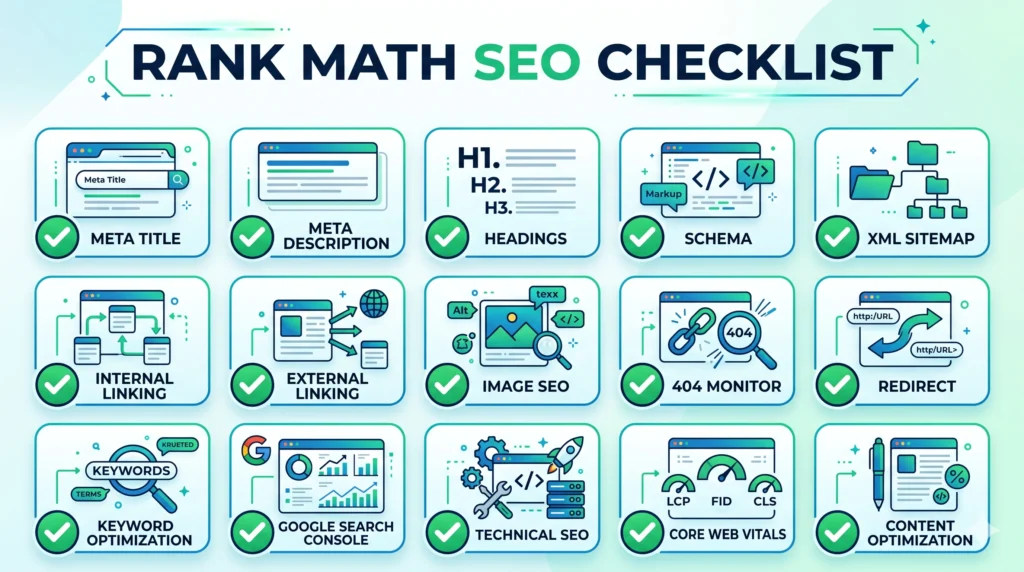
In the following sections, we’ll move beyond the basics and cover more than 50 practical SEO checkpoints, including:
- Site-wide SEO settings
- On-page optimization
- Content structure
- Keyword placement
- Internal linking
- External linking
- Image SEO
- Technical SEO
- Schema implementation
- Indexing improvements
- 404 monitoring
- Redirect management
- WooCommerce SEO
- Local SEO
- Advanced optimization tips
- Common mistakes to avoid
By completing every section of this checklist, you’ll build a stronger SEO foundation that supports sustainable organic growth rather than relying on shortcuts or outdated tactics.
In this Part, we’ll dive into the core checklist itself, starting with site-wide SEO settings, content optimization, image SEO, schema markup, internal linking, and other practical actions you can implement immediately.
1st Part: The Core Rank Math SEO Checklist (Steps 1–30)
Now it’s time to move from theory to action. This checklist covers the most important SEO settings you should review when using Rank Math. Follow each step carefully, and you’ll build a strong SEO foundation for your website.
Site-Wide SEO Checklist
1. Complete the Rank Math Setup Wizard
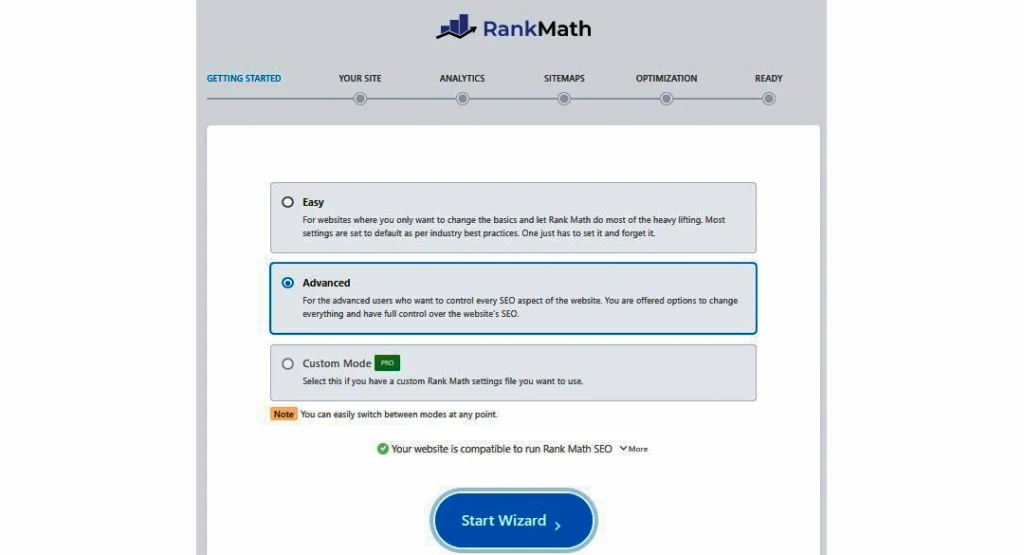
The Setup Wizard is the first step toward proper SEO. It configures your website type, sitemap, schema, and other important settings.
Why it matters: Setting things up correctly helps avoid common SEO mistakes from the start.
2. Connect Google Search Console
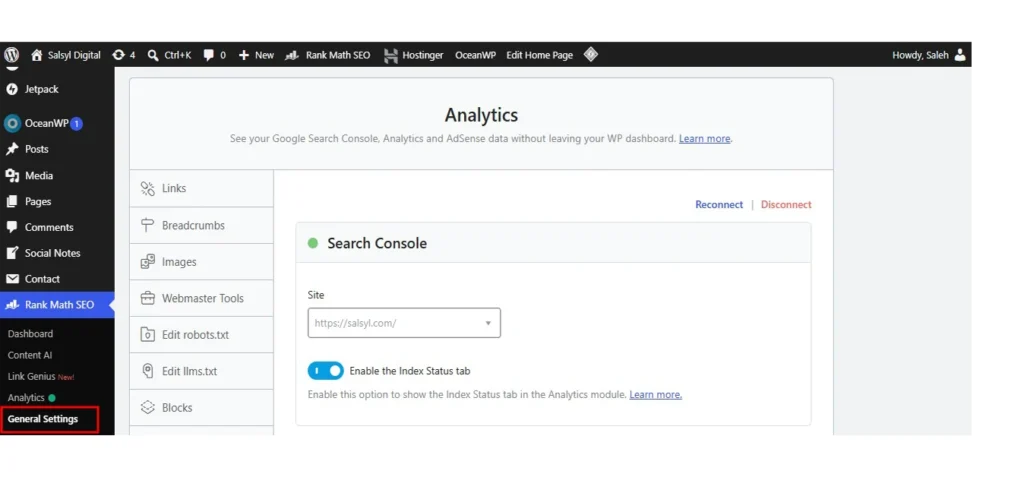
Connecting Google Search Console lets you monitor your website’s search performance directly from your WordPress dashboard.
Benefits include:
- Search impressions
- Clicks
- Average position
- Indexed pages
- Keyword performance
This data helps you identify pages that need improvement.
3. Connect Google Analytics
Tracking visitor behavior is just as important as tracking rankings.
Monitor:
- Organic traffic
- Bounce rate
- Session duration
- Top-performing pages
- Conversion paths
SEO is about attracting visitors and understanding what they do after they arrive.
4. Generate an XML Sitemap
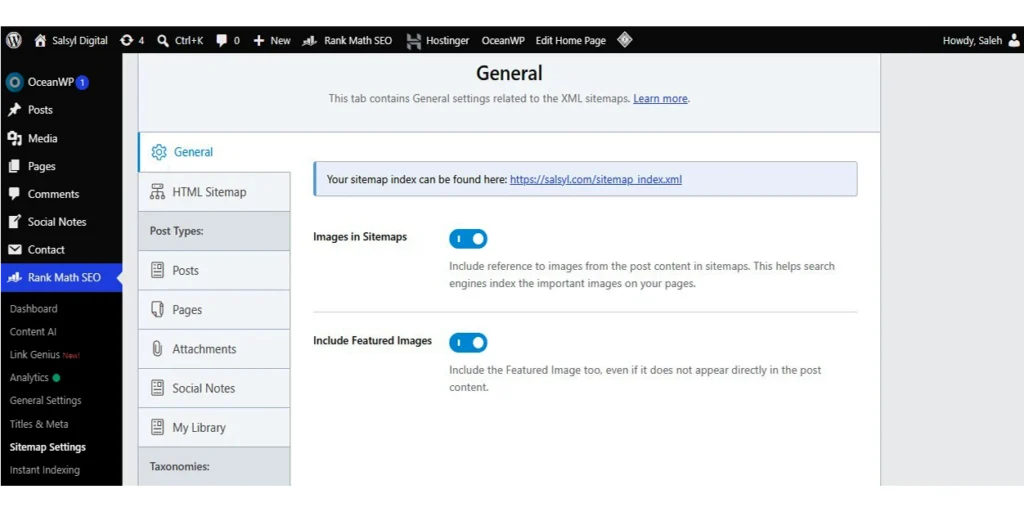
An XML sitemap helps search engines discover your pages more efficiently.
Make sure your sitemap includes:
- Posts
- Pages
- Categories (if useful)
- Products (WooCommerce)
- Images (optional)
Avoid including pages that shouldn’t appear in Google Search.
Learn more about XML Sitemaps from the official Google Search Central documentation.
5. Enable Breadcrumbs
Breadcrumbs improve navigation for both users and search engines.
Example:
Home → Blog → SEO → Rank Math SEO Checklist
Benefits:
- Better user experience
- Improved internal linking
- Enhanced search appearance
On-Page SEO Checklist
6. Write a Unique SEO Title
Every page should have its own title.
A good title:
- Includes your primary keyword
- Matches search intent
- Encourages clicks
- Stays within about 60 characters
Avoid duplicate titles across your website.
7. Create an Engaging Meta Description
Although Google may rewrite descriptions, writing one is still worthwhile.
A strong meta description:
- Summarizes the page
- Includes the focus keyword naturally
- Encourages users to click
- Stays around 150–160 characters
Think of it as your page’s advertisement in search results.
8. Use Only One H1 Heading
Each page should contain a single H1 heading that clearly describes the topic.
Use H2 and H3 headings to organize the rest of your content.
A clear heading structure improves readability and helps search engines understand your page.
9. Place Your Focus Keyword Naturally
Don’t force your keyword into every paragraph.
Instead, include it naturally in:
- Title
- URL
- First paragraph
- One or two headings
- Meta description
- Image ALT text (when relevant)
Write for people first, then optimize for search engines.
10. Keep URLs Short and Descriptive
Example:
Good
example.com/rank-math-seo-checklist
Avoid
example.com/blog/category/seo/the-complete-and-ultimate-rank-math-guide-for-beginners-2026
Short URLs are easier to understand and share.
11. Add Internal Links
Internal links help Google discover more of your content.
They also:
- Improve user navigation
- Increase page views
- Pass SEO value between pages
Whenever possible, link to related articles that provide additional value.
12. Link to Trusted External Sources
Quality outbound links improve credibility.
Examples include:
- Official documentation
- Government websites
- Research studies
- Industry experts
Avoid linking to spammy or low-quality websites.
13. Improve Readability
SEO isn’t just about keywords.
Write:
- Short paragraphs
- Clear sentences
- Descriptive headings
- Bullet lists
- Simple language
If readers enjoy your content, they’re more likely to stay on the page.
14. Match Search Intent
Before writing, ask yourself:
What does the searcher actually want?
For example:
Someone searching “Rank Math SEO Checklist” wants practical steps—not a long history of SEO plugins.
Meeting search intent is one of the biggest ranking factors today.
15. Update Older Content
SEO isn’t a one-time task.
Review older articles regularly by:
- Updating statistics
- Fixing broken links
- Adding new sections
- Improving examples
- Refreshing screenshots
Fresh content often performs better over time.
Image SEO Checklist
16. Compress Every Image
Large images slow down your website.
Use compressed images without sacrificing quality.
Faster pages create a better user experience and support stronger SEO performance.
17. Use Descriptive File Names
Instead of:
IMG001.jpg
Use:
rank-math-seo-checklist.jpg
Search engines use filenames as an additional signal to understand images.
18. Add Meaningful ALT Text
ALT text improves:
- Accessibility
- Image SEO
- Search engine understanding
Describe the image naturally.
Avoid stuffing keywords into every ALT attribute.
19. Choose Modern Image Formats
When supported, use modern formats like WebP or AVIF.
Benefits:
- Smaller file sizes
- Faster loading
- Better Core Web Vitals
20. Resize Images Before Uploading
Don’t upload a 4000-pixel-wide image if your content only displays it at 1200 pixels.
Smaller dimensions improve loading speed and reduce server storage.
Schema SEO Checklist
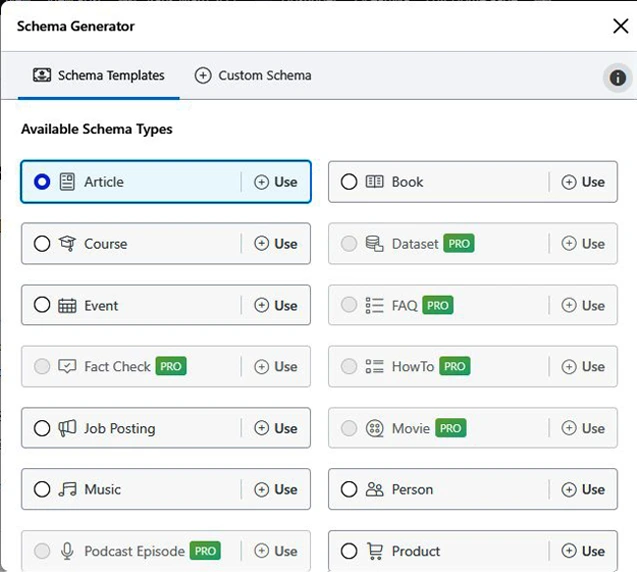
21. Select the Correct Schema Type
Rank Math makes schema implementation simple.
Choose the schema that matches your content.
Examples:
- Article
- Blog Post
- FAQ
- Product
- Recipe
- Course
- Local Business
Using the wrong schema may confuse search engines.
22. Add FAQ Schema
If your content answers common questions, include an FAQ section.
Benefits include:
- Better visibility
- Rich results eligibility
- Higher click-through rates
Answer questions clearly and concisely.
23. Use Organization or Person Schema
Tell search engines who created the content.
Complete your:
- Website name
- Logo
- Social profiles
- Author information
This strengthens your site’s credibility.
24. Avoid Duplicate Schema
Never add multiple plugins that generate the same structured data.
A duplicate schema can create validation errors and reduce effectiveness.
25. Test Your Structured Data
After publishing, verify that your schema works correctly.
Check for:
- Missing fields
- Invalid markup
- Rich result eligibility
Testing helps catch issues before they affect search performance.
Validate your structured data using Google’s Rich Results Test.
Content Optimization Checklist
26. Publish Helpful Content
Always ask:
Does this article solve a real problem?
Helpful content is more likely to earn:
- Backlinks
- Shares
- Longer reading time
- Higher rankings
27. Cover the Topic Completely
Instead of writing multiple thin articles, create comprehensive resources that answer related questions in one place.
Complete content builds authority and improves user satisfaction.
28. Avoid Keyword Stuffing
Repeating the same keyword excessively doesn’t improve rankings.
Instead:
- Use natural language
- Include related terms
- Focus on readability
Modern search engines understand context, not just exact matches.
29. Add a Strong Call-to-Action (CTA)
Every article should guide readers toward the next step.
Examples include:
- Read another guide
- Download a checklist
- Subscribe to your newsletter
- Try Rank Math
- Explore related tutorials
A clear CTA improves engagement and supports your website’s goals.
30. Review Before Publishing
Before clicking Publish, perform a final quality check:
✔ Grammar and spelling
✔ Mobile-friendly formatting
✔ Working internal and external links
✔ Optimized images
✔ Correct schema
✔ SEO title and meta description
✔ Proper heading structure
✔ Focus keyword placement
A five-minute review can prevent mistakes that hurt both user experience and SEO.
You’ve now completed the first 30 actionable checkpoints. In the final part of this guide, we’ll cover:
- Advanced Technical SEO Checklist
- Indexing & Crawl Optimization
- 404 Monitor & Redirections
- WooCommerce SEO Tips
- Local SEO Checklist
- Common Rank Math Mistakes to Avoid
- Final Summary
- Frequently Asked Questions (FAQ)
- Affiliate-Friendly Conclusion & CTA
These final steps will help you turn a well-optimized website into one that’s easier to crawl, easier to trust, and better positioned to grow organic traffic over the long term.
Final Part: Advanced Rank Math SEO Checklist (Steps 31–50+), Common Mistakes, FAQ & Conclusion
Congratulations! If you’ve completed the first 30 checkpoints, your website already has a solid SEO foundation. Now let’s focus on advanced optimizations that can help improve crawling, indexing, user experience, and long-term search performance.
Advanced Technical SEO Checklist
31. Enable Canonical URLs
Canonical URLs tell search engines which version of a page is the original. This helps prevent duplicate content issues, especially if similar pages or URL parameters exist.
Pro Tip: Always make sure each important page points to its correct canonical URL.
32. Configure Robots Meta Correctly
Not every page should appear in Google Search.
Consider using Noindex for:
- Thank You pages
- Search result pages
- Duplicate archives
- Thin content
- Private pages
Keeping unnecessary pages out of the index helps search engines focus on your most valuable content.
33. Optimize Category and Tag Archives
If your category pages contain helpful introductions and unique content, they can rank well.
However, avoid indexing thin or duplicate archive pages that offer little value.
34. Monitor Crawl Errors
Broken pages create a poor user experience and waste crawl budget.
Regularly review crawl errors and fix:
- Broken internal links
- Missing pages
- Redirect chains
- Server errors
35. Improve Core Web Vitals
Page experience matters.
Focus on:
- Faster loading times
- Stable page layout
- Quick interaction speed
- Mobile responsiveness
Even excellent content can struggle if the website is slow.
After improving your SEO, choosing the Best Hosting for Beginners can further enhance your website’s speed and rankings.
Indexing & Crawl Optimization Checklist
36. Submit Your Sitemap
After publishing important content, ensure your XML Sitemap is submitted to Google Search Console.
This helps search engines discover new pages more efficiently.
37. Check Index Status
Sometimes great content isn’t indexed.
Review Google Search Console regularly to identify:
- Crawled but not indexed pages
- Excluded URLs
- Duplicate pages
- Indexing issues
Fixing these problems can improve your site’s visibility.
38. Remove Broken Internal Links
Internal links should always lead to working pages.
Broken links:
- Frustrate visitors
- Reduce crawl efficiency
- Weaken your site’s overall quality
Perform regular link audits.
39. Fix Redirect Chains
One redirect is acceptable.
Multiple redirects slow page loading and reduce efficiency.
Example:
Page A → Page B → Page C → Page D ❌
Instead:
Page A → Page D ✅
40. Use HTTPS Everywhere
A secure website builds trust.
Always ensure:
- The SSL certificate is active
- Internal links use HTTPS
- Images load securely
- No mixed-content warnings appear
Rank Math Features You Shouldn’t Ignore
41. Use the 404 Monitor
The built-in 404 Monitor helps identify pages that visitors can’t access.
Common causes include:
- Deleted articles
- Changed URLs
- Broken backlinks
Review these errors regularly and fix them promptly.
42. Create Smart Redirects
Whenever you change a page URL, create a proper 301 Redirect.
This preserves SEO value and ensures visitors reach the correct destination.
Never leave important pages returning a 404 error if a relevant replacement exists.
43. Enable Image SEO Settings
Rank Math can automatically improve image optimization by generating missing ALT attributes and title attributes where appropriate.
This saves time while supporting accessibility and image search visibility.
44. Use SEO Analysis Regularly
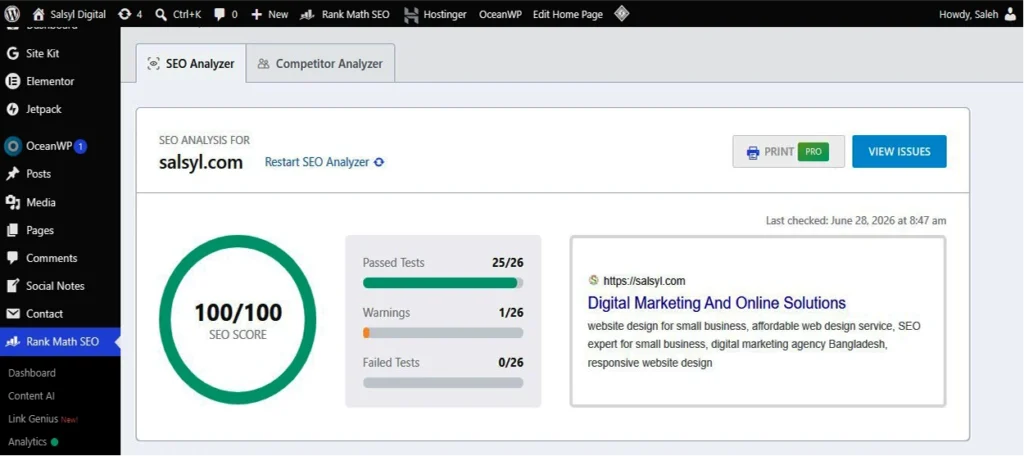
Rank Math’s SEO Analysis tool identifies common optimization issues.
Run an analysis periodically to discover:
- Missing metadata
- Slow pages
- Technical SEO problems
- Configuration errors
Treat it as a maintenance checklist rather than a one-time task.
WooCommerce SEO Checklist
If you run an online store, don’t overlook these steps.
45. Optimize Product Pages
Every product should include:
- Unique title
- Original description
- Optimized images
- Product Schema
- Clear pricing
- Customer-focused content
Avoid copying manufacturer descriptions.
46. Improve Product Categories
Category pages often rank for valuable keywords.
Include:
- Helpful introductions
- Internal links
- Optimized headings
- Unique descriptions
These pages can serve as effective sources of traffic.
Local SEO Checklist
47. Configure Local Business Schema
If your business serves a local area, complete your Local SEO settings.
Include:
- Business name
- Address
- Phone number
- Business hours
- Website
- Logo
Accurate information improves local search visibility.
48. Keep Business Information Consistent
Your Name, Address, and Phone Number (NAP) should match across:
- Your website
- Google Business Profile (Google Business)
- Social media
- Business directories
Consistency helps build trust with search engines.
Content Growth Checklist
49. Build Topic Clusters
Instead of publishing random articles, organize content around related topics.
Example:
Main Guide
- Rank Math SEO Checklist
Supporting Articles:
- Rank Math Setup Guide
- Rank Math Schema Tutorial
- Rank Math Image SEO
- Rank Math FAQ
- Rank Math vs Other SEO Plugins
This structure strengthens topical authority and improves internal linking.
50. Track Performance Every Month
SEO is an ongoing process.
Review monthly:
- Organic traffic
- Keyword rankings
- Click-through rate (CTR)
- Indexed pages
- Top-performing articles
- Pages losing traffic
Use this data to prioritize updates and new content.
“Discover how Omnisend can streamline your eCommerce automation process and enhance your marketing efforts seamlessly.”
Download the FREE Printable Rank Math SEO Checklist (PDF)
✔ Perfect for Bloggers
✔ Affiliate Marketers
✔ WordPress Users
✔ WooCommerce Websites
Common Rank Math SEO Mistakes to Avoid
Even with a powerful plugin, mistakes can limit your results.
Avoid these common issues:
- Installing Rank Math but skipping the Setup Wizard.
- Chasing a perfect SEO score instead of writing for users.
- Stuffing the focus keyword unnaturally.
- Publishing thin or AI-generated content without editing.
- Forgetting to add internal links.
- Ignoring image optimization.
- Leaving broken links unresolved.
- Using the wrong Schema type.
- Neglecting regular content updates.
- Expecting instant rankings instead of focusing on long-term consistency.
Remember: Rank Math is a tool—it amplifies a solid SEO strategy, but it can’t replace high-quality content.
Don’t Let Simple SEO Mistakes Hold You Back
Every improvement you make today can help your website perform better tomorrow. Whether you’re a blogger, affiliate marketer, freelancer, or business owner, Rank Math makes SEO easier with powerful automation and beginner-friendly tools.
Ready to optimize your website with confidence?
👉 Upgrade to Rank Math Pro and Unlock Advanced SEO Features
This page contains affiliate links. If you purchase through my link, I may receive a small commission at no additional cost to you. Your support helps me create more free WordPress and SEO tutorials.
Frequently Asked Questions (FAQ)
Is Rank Math Free enough for most websites?
Yes. The free version includes many powerful features such as XML Sitemaps, Schema Markup, SEO Analysis, Image SEO, and basic optimization tools. Many bloggers and small businesses can achieve excellent results without upgrading.
How often should I review this checklist?
Aim to revisit it every three to six months or whenever you redesign your site, publish a large amount of new content, or notice changes in search performance.
Does a 100/100 SEO score guarantee higher rankings?
No. SEO scores are helpful guidelines, not ranking guarantees. Google evaluates hundreds of signals, including content quality, relevance, user experience, and authority.
Is Rank Math suitable for beginners?
Absolutely. Its Setup Wizard, intuitive interface, and clear recommendations make it one of the most beginner-friendly SEO plugins for WordPress.
Should I optimize old content?
Yes. Updating older posts with fresh information, improved internal links, and better metadata is often one of the fastest ways to improve organic traffic.
Final Thoughts
SEO success doesn’t come from checking a single box or chasing perfect scores. It comes from consistently publishing helpful content, improving your website over time, and making it easier for both users and search engines to understand your pages.
This Rank Math SEO Checklist is designed to give you a practical roadmap. Whether you’re launching your first blog, growing an affiliate website, running a WooCommerce store, or managing client projects, these 50+ actionable steps will help you build a stronger SEO foundation.
Start with the basics, work through the advanced optimizations, and review your site regularly. Small improvements made consistently can lead to meaningful gains in visibility, traffic, and long-term growth.
Remember, SEO is a marathon—not a sprint. Focus on delivering value, stay updated with best practices, and let Rank Math support your journey toward better rankings.
Ready to Take Your SEO to the Next Level?
If you’re already using the free version of Rank Math, explore whether the premium features—such as advanced Schema options, Content AI, keyword tracking, and enhanced automation—fit your goals. Choose the tools that genuinely improve your workflow and help you create better content for your audience.
Most importantly, don’t let this checklist sit unused. Bookmark it, revisit it regularly, and apply one improvement at a time. Consistent action is what turns a good website into a great one.
Happy optimizing, and may your rankings continue to grow!