
What is SEO? Learn how Search Engine Optimization helps websites rank higher on Google with this simple beginner guide and practical SEO tips.
Imagine you have created a beautiful website. It loads quickly, looks professional, and contains helpful information. But after publishing it, almost nobody visits it.
This is a common problem for beginners.
The reason is simple—people cannot find your website.
That is where SEO comes in.
Search Engine Optimization, or SEO, helps search engines understand your website and show it to the right people. Whether you own a business website, an online store, a personal blog, or a portfolio, SEO can help you attract visitors without paying for every click.
Unlike paid advertising, SEO focuses on earning traffic naturally. When your pages answer people’s questions and provide useful information, search engines are more likely to recommend them.
The best part is that anyone can learn SEO. You do not need to be a programmer or a marketing expert. With the right knowledge and consistent effort, you can improve your website’s visibility over time.
In this beginner’s guide, you will learn:
- What SEO means
- Why SEO is important
- How search engines work
- The different types of SEO
- Basic SEO techniques anyone can follow
- Common mistakes to avoid
- Helpful SEO tools for beginners
By the end of this guide, you will have a solid understanding of SEO and know where to start improving your website.
What Is SEO?
SEO stands for Search Engine Optimization.
It is the process of improving your website so that search engines like Google can understand your content and show it to people searching for related topics.
For example, imagine someone searches for:
Best website design for small business
Google will display the websites it believes are the most helpful and trustworthy.
SEO helps your website become one of those results.
The goal of SEO is not to trick search engines. Instead, it is about creating valuable content, improving user experience, and making your website easy for search engines to understand.
Good SEO focuses on helping users first. When visitors find useful answers on your website, search engines notice that positive experience and are more likely to rank your pages higher.
Want to improve your WordPress website even further? Read our “WordPress SEO: The 7 Best Definitive Guides” to optimize every page for better rankings.
A Simple Example
Suppose you own a bakery.
Without SEO, people may never discover your website.
With good SEO, your website could appear when someone searches:
- Best bakery near me
- Fresh birthday cakes
- Custom wedding cakes
- Homemade bread
Those visitors are already interested in your products, making them more likely to become customers.
That is the real power of SEO.
Organic Traffic Explained
One of the biggest benefits of SEO is organic traffic.
Organic traffic refers to visitors who find your website through search engines without clicking paid advertisements.
For example:
- A person searches Google.
- They click your website.
- You do not pay Google for that click.
This is different from paid advertising, where every visitor costs money.
Although SEO takes time, the results often last much longer than paid campaigns.
Why Is SEO Important?
Many beginners ask,
“If I already have a website, why do I need SEO?”
The answer is simple.
A website without SEO is like opening a shop on a quiet street where nobody knows it exists.
SEO helps people discover your website when they are looking for information, products, or services.
Here are some of the biggest benefits.
1. Increases Website Traffic
Better rankings usually mean more visitors.
When your pages appear on the first page of Google, more people are likely to click them.
More visitors create more opportunities for leads, subscribers, or sales.
2. Builds Trust
People often trust websites that appear near the top of Google’s search results.
Ranking well can make your business look more reliable and professional.
Trust is especially important for new businesses trying to build an online reputation.
3. Saves Money
Paid advertising can deliver quick results, but the traffic stops when you stop paying.
SEO requires time and effort, but it can continue bringing visitors for months or even years.
That makes SEO a smart long-term investment.
4. Improves User Experience
Good SEO is not just about keywords.
It also encourages you to create a better website by:
- Improving page speed
- Making pages mobile-friendly
- Using clear headings
- Writing helpful content
- Organizing information logically
A better user experience benefits both visitors and search engines.
5. Supports Business Growth
Whether you are selling products, offering services, or sharing knowledge, SEO can help you reach more people.
More visibility often leads to:
- More inquiries
- More email subscribers
- More sales
- Better brand awareness
Even small improvements in SEO can have a positive impact over time.
How Does SEO Work?
To understand SEO, it helps to know what search engines actually do.
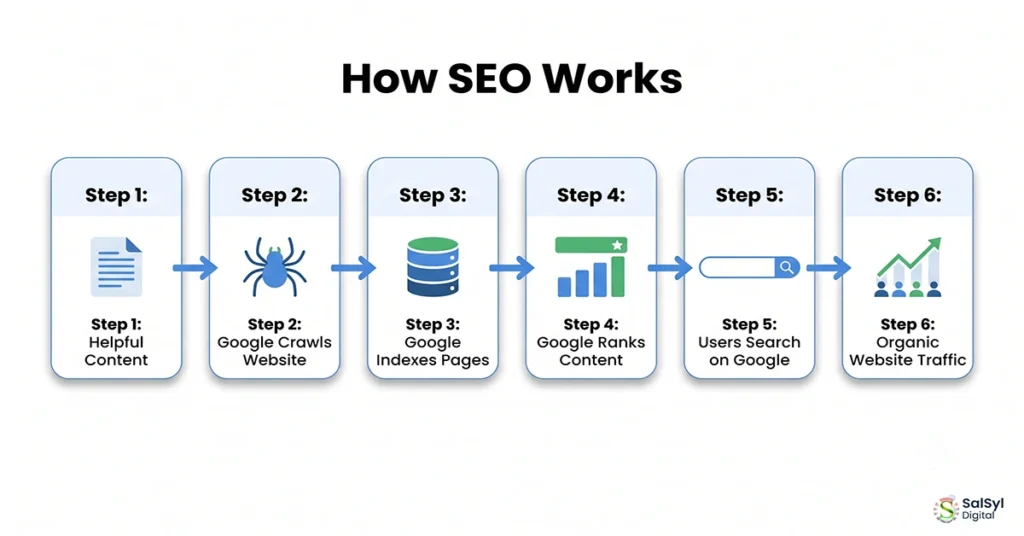
Search engines like Google perform three main tasks:
- Crawling
- Indexing
- Ranking
Let’s look at each one.
Step 1: Crawling
Google uses automated programs called crawlers (or spiders).
These crawlers travel across the internet, visiting websites and discovering new pages.
They follow links from one page to another and collect information about your content.
If your website has clear navigation and internal links, crawlers can explore it more easily.
Step 2: Indexing
After Google discovers your page, it decides whether to store it in its database.
This process is called indexing.
If your page is useful, original, and technically accessible, it has a better chance of being indexed.
A page that is not indexed cannot appear in Google search results.
Step 3: Ranking
When someone performs a search, Google compares thousands—or even millions—of pages to find the best answers.
It looks at many factors, including:
- Content quality
- Search intent
- Relevance
- Page speed
- Mobile friendliness
- Website authority
- User experience
- Helpful information
Google’s goal is simple:
Show the most useful page for every search.
That is why writing for people—not just for search engines—is the foundation of good SEO.
Think of SEO Like a Library
Imagine Google is the world’s largest library.
Every website is a book.
Google’s crawlers are librarians collecting books.
Indexing means placing each book on the correct shelf.
Ranking is deciding which books should be displayed first when someone asks a question.
Your goal is to make your book clear, useful, accurate, and easy to find.
That is exactly what SEO helps you do.
Key Takeaways
- SEO stands for Search Engine Optimization.
- SEO helps search engines understand your website.
- Organic traffic comes from unpaid search results.
- Good SEO improves visibility, trust, and user experience.
- Search engines crawl, index, and rank web pages before showing them in search results.
- SEO is a long-term strategy that rewards helpful, high-quality content.
Types of SEO You Should Know
Many beginners think SEO is only about adding keywords to a page. In reality, SEO is much broader than that.
A successful website usually combines several types of SEO to improve its visibility in search engines. Each type has a different purpose, but together they help your website perform better.
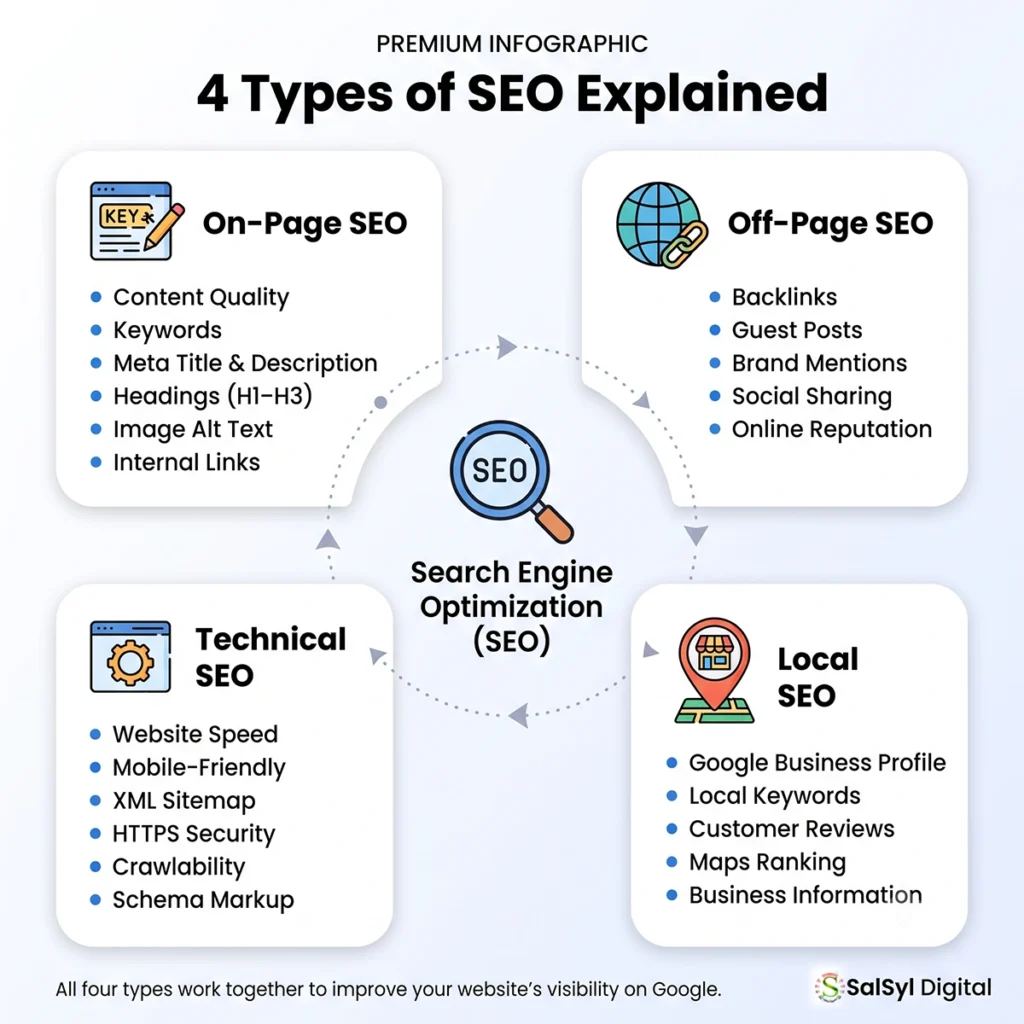
Let’s explore the four main types of SEO.
1. On-Page SEO
On-Page SEO includes everything you can optimize directly on your website.
It focuses on making each page clear, helpful, and relevant to the topic people are searching for.
Some common On-Page SEO activities include:
- Writing high-quality content
- Using your main keyword naturally
- Creating a clear page title
- Writing an attractive meta description
- Using H1, H2, and H3 headings correctly
- Adding image alt text
- Linking to related pages on your website
- Improving readability
Think of On-Page SEO as improving a book’s quality before placing it on a library shelf.
If your content is useful and easy to understand, both readers and search engines will appreciate it.
Example
Instead of writing:
Best Hosting Best Hosting Best Hosting Best Hosting
Write naturally:
Choosing the right web hosting is one of the most important decisions when starting a website. A reliable hosting provider improves speed, security, and user experience.
Natural writing always wins.
2. Off-Page SEO
Off-Page SEO refers to actions that happen outside your website.
The biggest example is backlinks.
A backlink is when another website links to one of your pages.
Search engines often treat backlinks as recommendations.
If trusted websites link to your content, Google may see your website as more trustworthy.
However, quality matters much more than quantity.
One backlink from a respected website is often more valuable than dozens of links from low-quality websites.
Other Off-Page SEO activities include:
- Brand mentions
- Guest blogging
- Social media sharing
- Digital PR
- Online reviews
- Community participation
Remember, backlinks should be earned—not bought.
Helpful content naturally attracts links over time.
3. Technical SEO
Technical SEO focuses on how well your website works behind the scenes.
Visitors may never notice these improvements, but search engines certainly do.
Important Technical SEO tasks include:
- Fast page loading speed
- Mobile-friendly design
- HTTPS security
- XML sitemap
- Robots.txt configuration
- Clean website structure
- Fixing broken links
- Structured data (Schema Markup)
Technical SEO helps search engines crawl and index your website efficiently.
A technically healthy website creates a better experience for everyone.
4. Local SEO
Local SEO is especially useful for businesses that serve customers in a specific area.
Examples include:
- Restaurants
- Dental clinics
- Repair services
- Hotels
- Law firms
- Digital agencies
- Local shops
If someone searches:
Website designer near me
Google usually shows local businesses first.
To improve Local SEO:
- Create a Google Business Profile
- Add accurate business information
- Collect genuine customer reviews
- Use consistent business details everywhere online
- Include local keywords naturally
Even if you work online, Local SEO can help people discover your business in your city or region.
Key SEO Terms Every Beginner Should Learn
SEO has many technical words, but you only need to understand the basics to get started.
Here are some important terms.
Keyword
A keyword is the word or phrase people type into Google.
Examples:
- What is SEO
- Best web hosting
- WordPress tutorial
- Website design for small business
Your content should answer the question behind the keyword—not just repeat it.
Search Intent
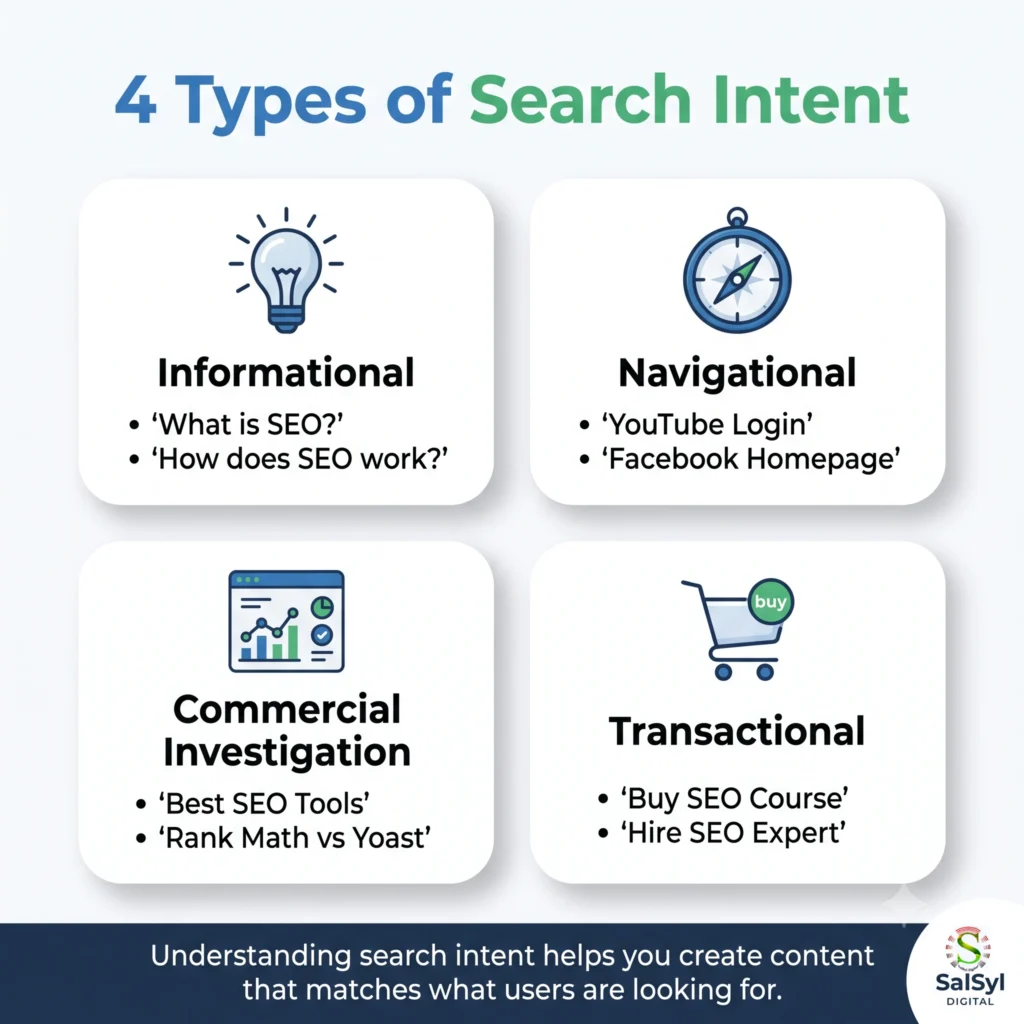
Search intent means the reason behind a search.
Someone searching:
Buy laptop online
wants to purchase something.
Someone searching:
What is a laptop?
wants information.
Understanding search intent helps you create the right type of content.
SERP
SERP stands for Search Engine Results Page.
It is simply the page Google displays after someone searches.
Ranking higher on the SERP usually means more visitors.
Meta Title
The Meta Title is the clickable headline people see in search results.
A good title should:
- Include your main keyword
- Be clear
- Be interesting
- Stay within recommended length
Example:
What Is SEO? Beginner’s Guide to Search Engine Optimization (2026)
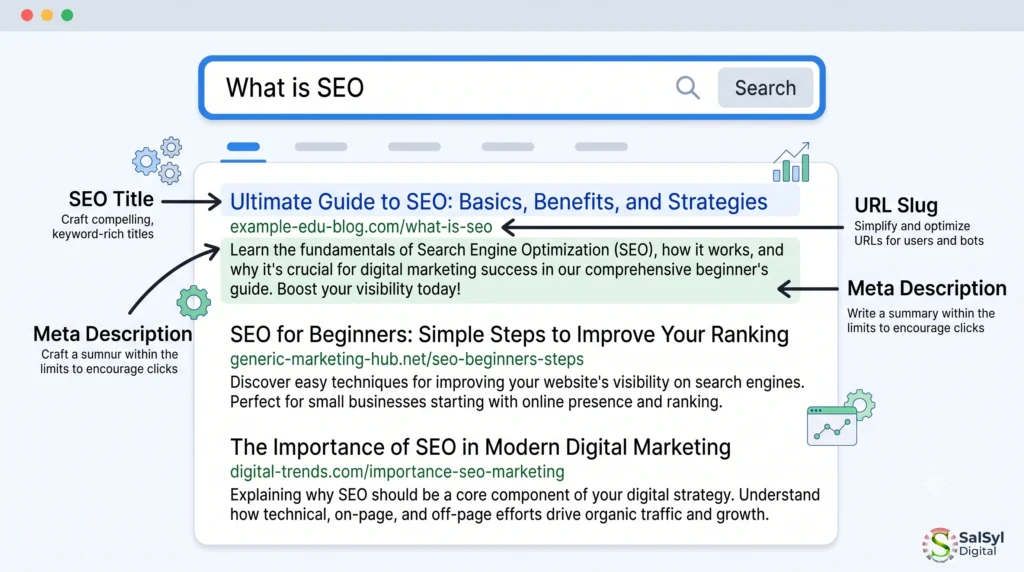
Meta Description
This is the summary displayed below the page title.
A strong meta description encourages people to click your page.
Keep it clear, informative, and natural.
Internal Link
An internal link connects one page of your website to another.
For example:
A blog post about SEO can link to another article about keyword research.
Internal links help visitors discover more content and help search engines understand your website structure.
External Link
An external link points to another trustworthy website.
Linking to reliable sources can improve credibility and provide additional value to readers.
Only link to high-quality and relevant resources.
Backlink
A backlink is a link from another website to your website.
Think of it as a recommendation.
The more trusted recommendations you earn, the stronger your website may become.
How to Start SEO Step by Step
Learning SEO becomes much easier when you follow a simple process.
You do not need expensive software or advanced technical skills to begin.
Here is a beginner-friendly roadmap.
Step 1: Choose the Right Keyword
Start by thinking about what people are searching for.
Instead of guessing, use keyword research tools to discover real search terms.
Good beginner tools include:
- Google Keyword Planner
- Google Search suggestions
- Google Trends
- AnswerThePublic
- Rank Math Content AI (optional)
Choose one primary keyword for each article.
Avoid targeting too many unrelated keywords on a single page.
Step 2: Understand What People Want
Before writing, search your keyword on Google.
Look at the pages already ranking.
Ask yourself:
- What questions are they answering?
- What information is missing?
- How can I make my article more useful?
Your goal is not to copy others.
Your goal is to create a better resource.
Step 3: Write Helpful Content
Focus on solving problems.
Avoid writing only for search engines.
Instead, explain topics clearly.
Use:
- Short paragraphs
- Simple words
- Examples
- Bullet points
- Clear headings
People enjoy reading content that is easy to follow.
Google notices that too.
Step 4: Optimize Your Page
Before publishing, check the basics:
✅ Add your main keyword naturally
✅ Write an attractive SEO title
✅ Create a compelling meta description
✅ Add image alt text
✅ Use descriptive headings
✅ Include internal links
✅ Add relevant external references
Step 5: Publish and Keep Improving
SEO is not a one-time task.
After publishing:
- Update outdated information
- Improve old articles
- Add new examples
- Fix broken links
- Refresh screenshots
- Expand useful sections
Many successful pages rank because they continue improving over time.
Publishing helpful content consistently is one of the best SEO strategies. Learn more in our How to Start a Blog guide.
Beginner SEO Checklist
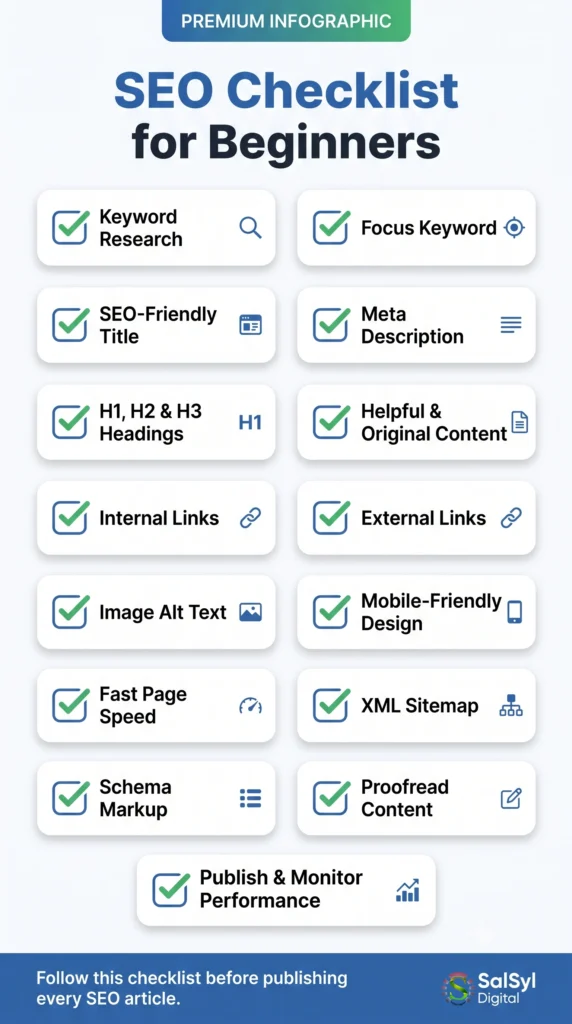
Before clicking the Publish button, ask yourself:
✔ Is my content original?
✔ Does it answer the reader’s question?
✔ Is the page easy to read?
✔ Did I use headings properly?
✔ Did I add internal links?
✔ Did I optimize my images?
✔ Does my page load quickly?
✔ Will readers find this article genuinely helpful?
If your answer is “Yes” to most of these questions, you are moving in the right direction.
Common SEO Mistakes Beginners Should Avoid
Everyone makes mistakes when learning something new, and SEO is no different. The good news is that most SEO mistakes are easy to fix once you know what to look for.
Here are some of the most common mistakes beginners make.
1. Keyword Stuffing
Many beginners believe that repeating the same keyword over and over will improve rankings.
It does not.
Instead, it makes your content difficult to read and may even hurt your SEO.
For example, avoid writing something like this:
“SEO is the best SEO because SEO helps SEO websites with SEO.”
Instead, write naturally.
Use your main keyword where it fits, and use related words throughout the article.
Always write for people first.
2. Writing Only for Search Engines
Some articles are full of keywords but provide very little value.
Google has become much better at recognizing helpful content.
Ask yourself:
- Does this article answer the reader’s question?
- Would I recommend this article to a friend?
If the answer is yes, you are moving in the right direction.
3. Ignoring Search Intent
Not every search has the same purpose.
Someone searching for:
“What is SEO”
wants to learn.
Someone searching for:
“Buy SEO services”
wants to hire someone.
Understanding the searcher’s intent helps you create the right content.
4. Publishing Thin Content
A short article with little useful information rarely performs well.
Instead of writing five small articles, consider creating one complete guide that answers the topic in detail.
Quality is usually more important than quantity.
5. Forgetting Internal Links
Internal links help readers discover more content on your website.
They also help search engines understand how your pages are connected.
Whenever relevant, link to another helpful article on your own website.
6. Not Optimizing Images
Large image files can slow down your website.
Before uploading images:
- Compress the file size
- Use descriptive filenames
- Add meaningful alt text
- Choose modern image formats when possible
Images should support your content, not slow it down.
If you’re building a WordPress website with Elementor, check out our Element Pack Review to discover its best features.
7. Ignoring Mobile Users
Today, most people browse the web using smartphones.
If your website is difficult to use on mobile devices, visitors may leave quickly.
Always test your pages on both desktop and mobile before publishing.
8. Never Updating Old Content
SEO is not a one-time task.
Information changes.
Google updates.
Your competitors improve their content.
Review your important articles every few months and keep them fresh.
Small updates can sometimes make a big difference.
Best Free SEO Tools for Beginners
You do not need expensive software to start learning SEO.
Many free tools provide valuable insights.
Here are some excellent options.
Google Search Console
Google Search Console helps you understand how your website performs in Google Search.
You can:
- Submit your sitemap
- Check indexing status
- Monitor search performance
- Find pages with errors
- See which keywords bring visitors
Every website owner should use it.
Google Analytics
Google Analytics shows how visitors interact with your website.
You can learn:
- Where visitors come from
- Which pages are most popular
- How long people stay
- Which devices they use
These insights help you improve your content.
Google Keyword Planner
This free tool helps you discover keyword ideas.
Although designed for advertisers, it is also useful for SEO research.
Google Trends
Google Trends shows whether a topic is becoming more or less popular over time.
It is especially useful when planning seasonal content.
Google PageSpeed Insights
Website speed matters for both users and search engines.
PageSpeed Insights analyzes your pages and suggests improvements.
Even small speed improvements can create a better user experience.
Rank Math SEO
If you use WordPress, Rank Math is one of the most beginner-friendly SEO plugins available.
It helps you:
- Optimize titles
- Create meta descriptions
- Generate XML sitemaps
- Add Schema Markup
- Improve on-page SEO
Remember that plugins only provide guidance.
Good content is still the most important ranking factor.
If you’re using WordPress, our Ultimate Rank Math SEO Checklist will help you optimize your website more effectively.
How Long Does SEO Take?
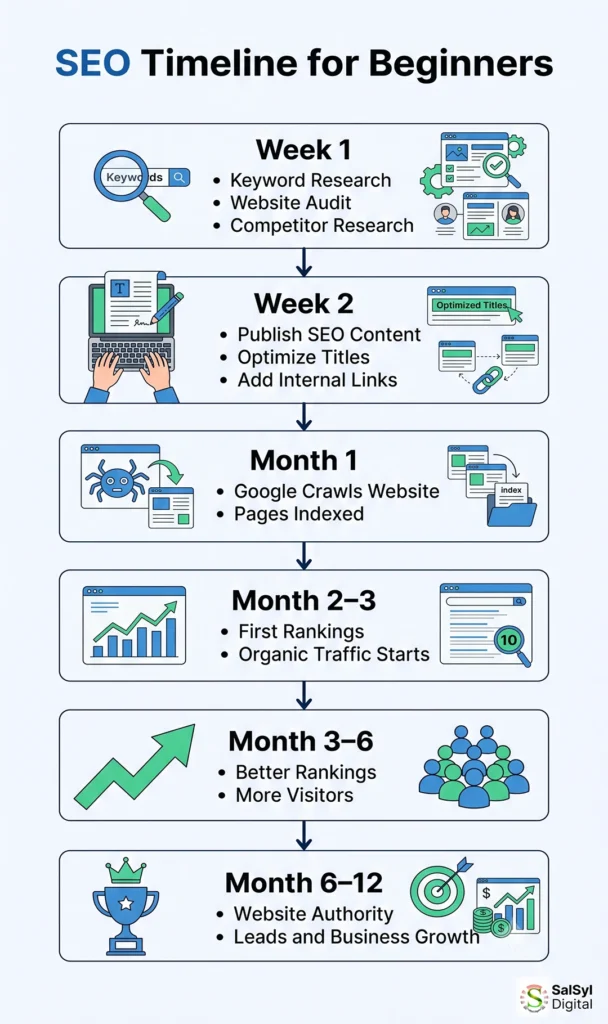
One of the most common questions beginners ask is:
“How long before I see results?”
The honest answer is:
It depends.
SEO is a long-term strategy.
Some pages may begin receiving impressions within a few weeks.
More competitive keywords often take several months to rank well.
Many websites start seeing meaningful improvements within 3 to 6 months, while highly competitive industries may take longer.
Factors that affect SEO results include:
- Competition
- Content quality
- Website authority
- Backlinks
- Technical SEO
- Content consistency
Patience is an important part of SEO success.
Practical SEO Tips for Beginners
If you remember only a few things from this guide, make sure they’re these tips.
Write for Real People
Your readers should always come first.
If people enjoy your content, search engines are more likely to value it too.
Focus on One Main Topic
Avoid trying to cover too many unrelated subjects on one page.
A focused article is usually easier to rank.
Use Clear Headings
Break long articles into sections.
Good headings improve readability for both users and search engines.
Answer Questions Clearly
Many Google searches are questions.
Provide direct, simple answers before explaining in more detail.
Keep Learning
SEO changes regularly.
Read trusted blogs, experiment with your own website, and continue improving your skills.
Publish Consistently
One great article is helpful.
Twenty great articles are even better.
Publishing consistently helps build topical authority over time.
Improve Existing Content
Sometimes updating an older article is more effective than writing a brand-new one.
Refresh statistics, examples, screenshots, and outdated information whenever needed.
Build Trust
Always provide accurate information.
Avoid misleading headlines or exaggerated promises.
Trust is one of the most valuable assets a website can earn.
Monitor Your Results
Use Google Search Console and Google Analytics to understand what is working.
SEO is a process of continuous improvement.
Measure, learn, and adjust.
Looking for reliable hosting? Read our Hostinger Review to see why it’s a popular choice for beginners and small businesses.
A Quick SEO Checklist
Before publishing any article, ask yourself:
✔ Does the title clearly explain the topic?
✔ Have I answered the reader’s main question?
✔ Is the content original?
✔ Is the page easy to read?
✔ Have I used headings correctly?
✔ Did I add internal links?
✔ Did I optimize my images?
✔ Is the website mobile-friendly?
✔ Have I written a helpful meta description?
✔ Would I proudly recommend this article to someone else?
If the answer is “Yes,” your article is in good shape.
Frequently Asked Questions (FAQ)
Is SEO free?
Yes. SEO can be done without paying for ads. However, it requires time, effort, and consistency. You may choose to invest in premium tools, but many beginners achieve excellent results using free resources.
Can I learn SEO by myself?
Absolutely.
Many successful website owners and digital marketers started by learning SEO through blogs, videos, and hands-on practice.
The best way to learn SEO is to apply what you learn to your own website.
Is SEO difficult for beginners?
Not at all.
The basics of SEO are easy to understand. The real challenge is staying consistent and continually improving your content over time.
Start with simple techniques, and learn more as your website grows.
How long does it take to rank on Google?
There is no fixed timeline.
Some pages may appear in search results within a few weeks, while others can take several months to rank well.
SEO is a long-term strategy, and consistent effort usually delivers better results than chasing quick shortcuts.
What is the difference between SEO and SEM?
SEO focuses on getting free, organic traffic from search engines.
SEM (Search Engine Marketing) includes paid advertising, such as Google Ads, where you pay to appear in search results.
Many businesses use both strategies together, but SEO provides long-term value by attracting visitors without paying for every click.
Do I need coding skills to learn SEO?
No.
Basic SEO does not require programming knowledge.
You can learn keyword research, content optimization, image SEO, and technical basics without writing code.
As your experience grows, learning a little HTML can be helpful, but it is not required for beginners.
Final Thoughts
SEO is not about finding secret tricks or trying to outsmart search engines.
It is about creating helpful content, providing a good user experience, and making your website easy to understand.
If you remember only one lesson from this guide, let it be this:
Write for people first, and optimize for search engines second.
That simple approach has helped countless websites grow, and it will continue to be one of the most reliable SEO strategies.
Do not worry about learning everything in one day.
Start with one article.
Improve one page at a time.
Learn from your results.
Stay consistent.
Small, regular improvements often lead to impressive long-term growth.
SEO is a journey, not a race.
The sooner you begin, the sooner your website can start attracting the visitors you want.
Choosing reliable hosting is the first step toward a faster website. Read our Best Web Hosting for Beginners guide before making a decision.
Conclusion
SEO is one of the most valuable skills you can learn for growing a website.
Whether you run a personal blog, a small business website, or an online store, understanding the basics of SEO can help you reach more people without relying only on paid advertising.
Focus on creating helpful content, improving your website step by step, and providing the best possible experience for your visitors.
Results may not happen overnight, but every well-optimized article brings you one step closer to long-term success.
Start today, stay consistent, and let your website grow naturally.