
What if you could turn your ideas into income… even while you sleep?
Blogging is no longer just a hobby. Today, it is one of the smartest ways for small business owners, marketers, freelancers, and beginners to build an online presence, attract clients, and earn passive income.
The best part?
👉 You don’t need coding skills
👉 You don’t need a big budget
👉 You need the right strategy
In this guide, you will learn how to start a blog (beginner-friendly) step by step.
Learn how to start a blog step by step with this beginner-friendly guide. Perfect for small business owners, marketers, freelancers & bloggers.
Why Blogging is Still Powerful in 2026
Blogging helps you:
- Build authority in your niche
- Get free traffic from search engines
- Promote your services or products
- Earn money with ads & affiliate marketing
💡 Many freelancers and small businesses now use blogs as their main marketing channel.
🎯 Step 1: Choose a Profitable Blog Niche (Important)

How to Choose a Blog Niche for Beginners
Choosing the right niche is the foundation of your success.
Best Niches for Beginners
- Digital marketing
- Blogging & SEO
- Online income
- Small business tips
- Freelancing
💡 Pro Tip: Choose a niche that has:
- High search demand
- Low to medium competition
- Your personal interest
👉 You can also read our detailed guide on email marketing to grow your blog audience.
🌐 Step 2: Choose a Domain Name (SEO Friendly)
How to Pick a Perfect Blog Domain Name
Your domain name is your brand identity. Choosing the right domain name is very important. It affects your branding, SEO, and user trust. A good domain name makes your blog easy to remember, easy to find, and easy to grow.
Let’s explain the three key tips in detail:
Keep It Short & Simple
A short and simple domain name is always better.
Why?
- Easy to remember
- Easy to type
- Less chance of spelling mistakes
- Looks more professional
👉 Example:
✔ bestblogtips.com
❌ bestblogtipsforbeginners2026.com
If your domain is too long, users may:
- Forget it
- Type it wrong
- Avoid visiting your site
💡 Best Practice:
Try to keep your domain within 2–3 words and under 15 characters if possible.
Use Keywords (If Possible)
Using keywords in your domain can help both users and search engines understand your website’s topic.
Why Keywords Matter?
Search engines like Google use keywords to understand your content.
👉 Example:
If your niche is blogging:
✔ bloggingtips.com
✔ startablogguide.com
These domains clearly show what the website is about.
⚠️ Important Note:
Don’t force keywords unnaturally.
❌ best-cheap-fast-seo-blog-tips.com (too spammy)
✔ smartblogguide.com (clean & brandable)
💡 Balance is key:
Keyword + Brand = Perfect domain
Avoid Numbers and Symbols
Numbers and special characters make your domain confusing.
Problems with Numbers:
- People don’t know if it’s “5” or “five.”
- Harder to remember
- Looks less professional
👉 Example:
❌ blogtips4u.com
✔ blogtipsforyou.com
Problems with Symbols (like hyphens “-”)
- Hard to type
- Easy to forget
- Looks spammy
👉 Example:
❌ best-blog-tips-online.com
✔ bestblogtips.com
💡 Bonus Tip (Pro Level)
Before finalizing your domain:
✔ Check if:
- Social media username is available
- Domain is not trademarked
- It’s easy to pronounce
👉 If people can say it easily, they can remember it easily.
Final Thoughts
A good domain name is:
✔ Short
✔ Clear
✔ Brandable
✔ Easy to type
✔ SEO-friendly
👉 Your domain is your online identity—choose it wisely.
💻 Step 3: Buy Hosting and Install WordPress
Best Hosting Setup for Beginner Bloggers
To start a blog, you need hosting.
What to Look for in Hosting
- Fast loading speed
- 99.9% uptime
- Good customer support
After buying hosting:
- Connect your domain
- Install WordPress (1-click setup)
You can also check out our comprehensive guide on the best hosting options for 2026 to boost your blog’s performance.
⚙️ Step 4: Set Up Your Blog Properly
WordPress Setup for Beginners
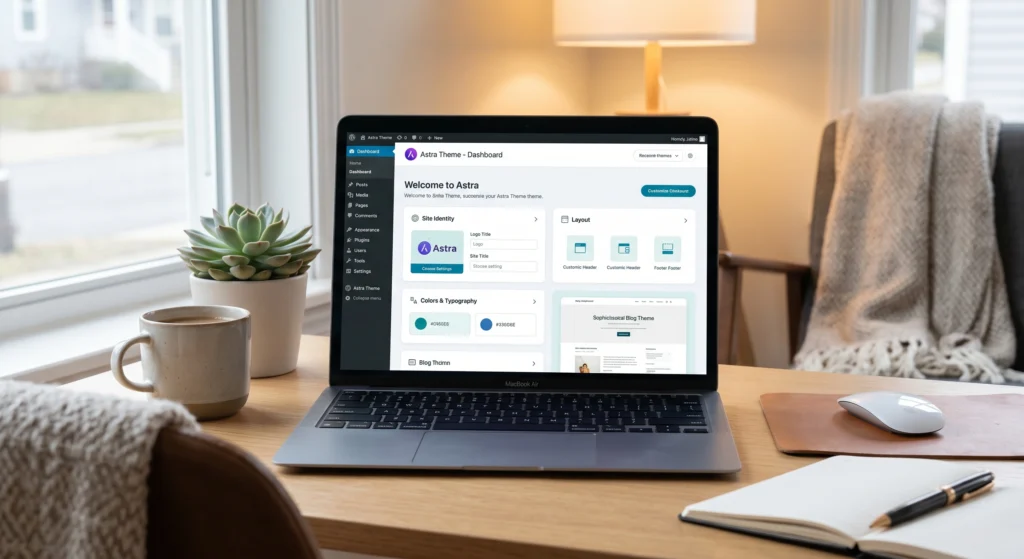
Setting up your blog properly is one of the most important steps. A poor setup can slow down your website, affect SEO, and reduce user experience. However, a clean and optimized setup helps your blog rank in Google’s search results and keeps visitors engaged.
Basic WordPress Settings You Must Configure
After installing WordPress, go to your dashboard and adjust these:
- Site Title & Tagline → Add your brand name and a short description
- Timezone & Language → Set according to your location
- Discussion Settings → Control comments and spam
Set SEO-Friendly Permalink Structure
Permalinks are your blog URLs.
👉 Go to: Settings → Permalinks
Choose: Post Name
This helps both users and search engines understand your content.
Connect your blog to Google Search Console, and monitor how your pages appear in search results.
Choose a Fast & Clean Theme
Your theme controls your blog design and speed.
✔ Choose a theme that is:
- Lightweight
- Mobile responsive
- SEO optimized
Avoid heavy themes with too many animations—they slow down your site.
Make Your Blog Mobile-Friendly
Most users visit from mobile devices. So your blog must look good on:
- Smartphones
- Tablets
A mobile-friendly blog improves ranking and user experience.
Improve Website Speed
Speed is very important for SEO and user satisfaction.
👉 Basic tips:
- Use a lightweight theme
- Install cache plugin
- Optimize images
A fast website keeps visitors longer and reduces bounce rate.
Basic Security Setup
Protect your blog from hackers and spam.
✔ Use:
- Strong password
- Security plugin
- Regular updates
✅ Final Tip
Think of your blog setup like building a strong foundation. If your setup is clean, fast, and secure—everything else becomes easier.
🔌 Step 5: Install Essential Plugins
Must-Have Plugins for Blogging
Plugins are powerful tools that add extra features to your blog without coding. But here’s the truth—too many plugins can slow down your website. So you must use only the essential ones.
What Are Plugins?
Plugins are like apps for your website. They help you:
- Improve SEO
- Increase speed
- Add contact forms
- Secure your blog
Essential Plugins Every Blogger Should Use
🔍 1. SEO Plugin (Most Important)
An SEO plugin helps your blog rank on search engines like Google, Bing, and Yahoo.
✔ Features:
- Meta title & description
- Keyword optimization
- Sitemap generation
👉 This is a must-have for every blog.
⚡ 2. Cache Plugin (Speed Optimization)
A cache plugin makes your website load faster.
✔ Benefits:
- Faster loading time
- Better user experience
- Improved SEO ranking
Slow websites lose visitors quickly—so this is critical.
🔐 3. Security Plugin
Security plugins protect your blog from:
- Hackers
- Malware
- Spam attacks
✔ Features:
- Login protection
- Firewall
- Malware scan
📩 4. Contact Form Plugin
A contact form allows visitors to reach you easily.
✔ Use it for:
- Customer inquiries
- Business leads
- Support requests
👉 Place it on your “Contact” page.
🖼️ 5. Image Optimization Plugin
Images can slow down your website if not optimized.
✔ This plugin helps:
- Compress images
- Improve loading speed
- Boost SEO
📊 6. Analytics Plugin (Optional but Recommended)
Track your blog performance.
✔ You can see:
- Visitors
- Traffic sources
- Popular posts
This helps you improve your strategy.
⚠️ Common Plugin Mistakes
Avoid these mistakes:
❌ Installing too many plugins
❌ Using outdated plugins
❌ Ignoring updates
💡 Pro Tips for Beginners
- Keep plugins under 10–12
- Always update plugins regularly
- Delete unused plugins
✅ Final Thoughts
Plugins can make your blog powerful—but only if used wisely.
👉 Start with essential plugins
👉 Focus on speed, SEO, and security
👉 Keep your website clean and fast
Plugins help improve performance and SEO.
✍️Step 6: Create Important Pages
Pages You Must Create Before Publishing
To get approval from ad networks, create:
- About Us
- Contact Page
- Privacy Policy
- Terms & Conditions
- Disclaimer
💡 These pages build trust and improve your site’s credibility.
📝 Step 7: Write SEO Friendly Blog Content
How to Write a Blog Post That Ranks on Google
Writing Tips for Beginners
- Use simple English
- Add headings (H2, H3)
- Use keywords naturally
- Keep paragraphs short
- Solve real problems
Example Keywords Used in This Article
- How to start a blog
- beginner blogging guide
- start a blog in 2026
- blogging for small business
🔍Step 8: Basic SEO Setup
SEO Tips for Beginner Bloggers
To rank on search engines like Google, Bing, and Yahoo:
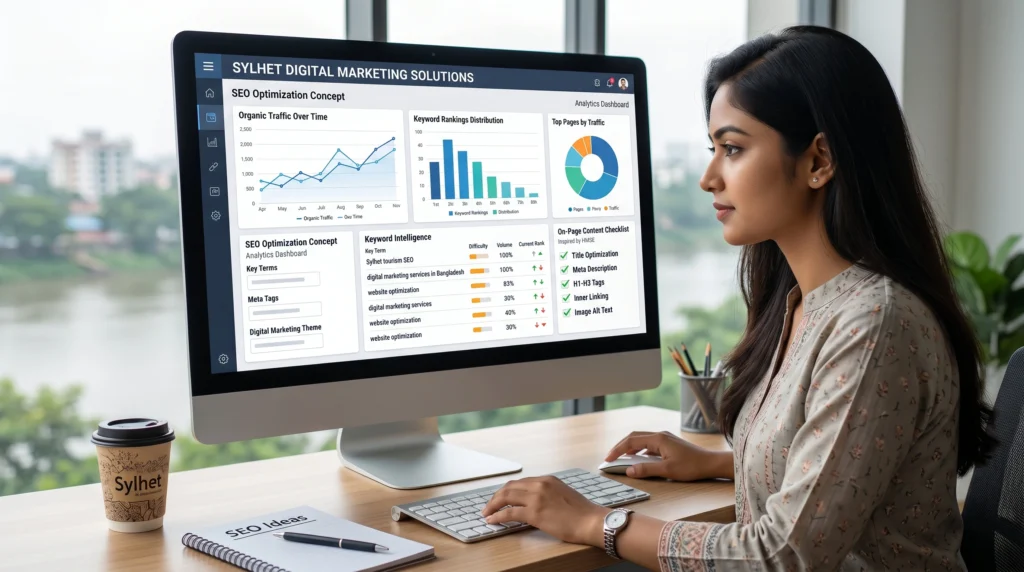
On-Page SEO Checklist
- Add focus keyword
- Write meta title & description
- Use internal linking
- Optimize images (ALT text)
📢 Step 9: Promote Your Blog for Traffic
How to Get Traffic to a New Blog
Traffic Sources
- Facebook Groups
- Quora
💡 Promotion is as important as writing.
💰 Step 10: How to Make Money from Blogging
Blogging Income Ideas
- Ad networks (AdSense)
- Affiliate marketing
- Selling services
- Digital products
👉 Blogging can become a long-term income source.
⚠️ Common Blogging Mistakes to Avoid
Beginner Mistakes
- Choosing the wrong niche
- Ignoring SEO
- Copying content
- Expecting fast results
Why is a Blog Needed on a Business Website?
A Short Story: From Silent Website to Steady Customers
Rahim had a clean and professional business website. He offered great services, fair pricing, and even had a beautiful portfolio. But there was one problem—no visitors. Weeks passed, then months, and still no calls, no inquiries, no growth.
One day, he learned that search engines like Google don’t just rank websites—they rank helpful content. So Rahim started a simple blog. He wrote about common customer questions, shared tips, and explained his services in easy language.
Slowly, things began to change. His blog posts started appearing in search results. People visited his website, read his content, and began to trust him. Soon, those visitors turned into real customers.
That’s the power of a blog.
A business website without a blog is like a shop without customers. But with the right blog content, your website becomes a place where people discover you, trust you, and choose your service.
Conclusion
Starting a blog is one of the best online opportunities today.
If you follow this beginner-friendly blogging guide, you can:
✔ Build a brand
✔ Grow traffic
✔ Earn online
👉 Start today. Don’t wait for perfect.