
Choosing the right email marketing tool can be confusing, especially with so many options available. Many beginners and small business owners struggle to decide which platform offers the best features, pricing, and results.
That’s why comparing GetResponse VS ConvertKit is so important. Both tools are popular and powerful, but they are designed for different types of users.
If you choose the wrong one, you may waste time and money and miss growth opportunities. In this guide, we will break down GetResponse VS ConvertKit in a simple way so you can understand their key differences, features, and benefits. By the end, you will know which tool is the best fit for your business needs.
GetResponse VS ConvertKit
Compare GetResponse VS ConvertKit to find the best email marketing tool. Learn features, pricing, and which platform suits your business needs.
GetResponse and ConvertKit are marketing automation tools that help you achieve the same primary objectives. These programs can help you build email lists and contacts.
They can help you sell products and services. And we’ll feel a little biased if we only include this article in GetResponse, so we’ll discuss both tools in detail here. You will select the option that best applies to you from the choices provided. We prioritize maintaining the quality of our document and monitor it closely.
Visit my other article if you are interested in knowing about digital marketing strategies.
About GetResponse
GetResponse is a leading online marketing software solution for businesses of all sizes, from large enterprises to small startups. From humble beginnings in a small Polish town in 1997, Simon Grabowski’s vision is now evolving into a world-class brand and workforce. They registered their domain in 1998.
About ConvertKit
ConvertKit is the premier marketing platform for creators, serving both large and small businesses. ConvertKit was founded by Nathan Barry in January 2013 when he needed a great way to reach his audience as a blogger and creator selling books and courses via email. From scratch in early 2017 to visual automation design, at a glance, to complete the marketing funnel. Introducing exciting new features that make your experience faster, easier, and incredibly fun!
What is GetResponse?
GetResponse is an all-in-one online marketing software that boosts sales, grows your audience, and keeps you connected with customers. Its platform features over 30 user-friendly tools to transform your online marketing and achieve significant results.
What is ConvertKit?
As mentioned above, ConvertKit is the leading creator marketing platform. With it, you can connect with your fans, inspire your community, and make a living online through the only marketing platform created by creators.

Are there any marketing automation features?
GetResponse
GetResponse allows you to enhance customer experiences automatically and bring your customer service to life according to your needs through its visual marketing automation workflows. GetResponse Marketing Automation workflow enables you to send automated emails to all new subscribers and cart abandoners, add personal relationships to every message, and communicate with your audience.
ConvertKit
ConvertKit is well-known for its online business automation capabilities. The email marketing automation tool makes it easy to use a variety of marketing features. ConvertKit focuses on email marketing functionality and works best. For everything else, they work to make integrations with the top 70 best associates that help you maintain your email marketing automation. Hundreds more integrations can be accessed using Zapier.
What are landing page capabilities?
GetResponse
GetResponse lets you create free landing pages, create unlimited landing pages to register and sell new customers, create your designs, or choose from over 100 free landing page templates.
GetResponse offers more than 200 landing page templates. Choose from dozens of ready-made, mobile-responsive templates sketched to transform visitors into contacts.
You can create mobile-friendly landing pages easily in a minute with the drag-and-drop editor, selecting templates for specific business purposes, and customizing them.
GetResponse lets you create custom landing pages using the available tools, making your page appear in relevant search results and easily visible. You can analyze the performance of your landing page.
GetResponse offers various features, such as customizable sign-up forms, A/B testing, content section modifications, and video integration. You can enhance your designs using GIFs and free stock photos.
Additionally, GetResponse offers several tools that enable you to create effective landing pages without needing expert IT skills!
ConvertKit
The Kit landing page platform is extremely easy to use. Its minimal design attracts the reader. You do not need code to create a beautiful landing page. All Kit templates are fully responsive. You will have a fully formatted landing page that is easy to view on any device.
With the integration of ConvertKit and Unsplash, you’ll be pleasantly surprised to find free and unique images for your landing page at the click of a button.
The opt-in forms on the ConvertKit landing page help you connect with your visitors and gather information to increase your sales, including turning your readers into customers.
ConvertKit’s free landing page builder provides quick updates on conversion rates and subscriber counts. So, you can easily set up your preferred tracking methods and give your landing page the optimized boost it deserves.
For more advanced local tracking options, you can add your Google Analytics, Segments, and Facebook business ID to connect potential analytics with your ConvertKit landing page builder.
ConvertKit landing pages enable you to collect custom data, deliver lead magnets, customize success messages, connect to automation, ensure GDPR compliance, and integrate with other tools.
What are their email marketing strategies?
GetResponse
GetResponse offers a powerful email marketing tool with easy-to-use design features, a proven 99% delivery rate, and professional email templates.
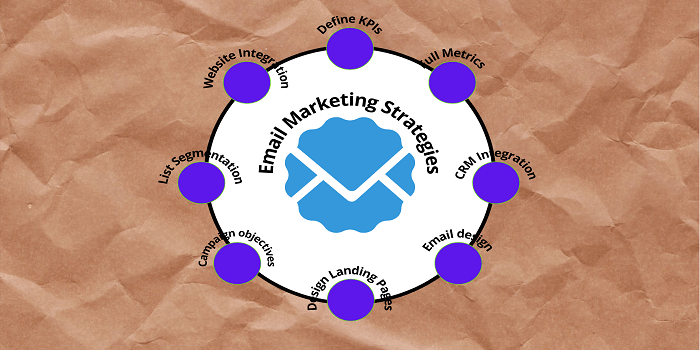
Here are some GetResponse email marketing strategies. You can use them to send newsletters and create automated email sequences. This tool helps you automate emails, send blog digests, and manage social media activities.
Using a perfectly timed email strategy allows you to deliver messages at the right moment. With the paid add-on for transactional email, you can send receipts or reminders using SMTP-triggered emails.
ConvertKit
ConvertKit IS an email marketing tool. You can easily connect with your audience and grow your business using the ConvertKit email marketing Strategy. The delivery rate is 98%, and the average open rate is 30%.
In ConvertKit, you’ll find a fantastic bare-bones editor called the WYSIWYG (What You See Is What You Get) editor, in which you can write your email. ConvertKit email marketing strategies also allow you to send newsletters and create automated email sequences.
You can create as many branded email templates as you like. It helps you add buttons, pictures, or videos to your email with a hassle-free, simplified interface.
You can send an email broadcast by choosing your contacts, writing your message, and then either sending it right away or scheduling it for later.
You can set up your subscriber funnel and automatically send emails based on your customers’ journey by writing content and adding more emails to your campaigns. ConvertKit is customer-centric. You can easily organize all your customers using a list with tags and segments. You can rely on ConvertKit’s email automation to reach the right people.
Which one is better for leading to ease of Facebook ads and Google ads?
GetResponse
GetResponse has two tools: Social Ad Creator and Facebook Ad Builder. Using these tools, you can create and publish ads (both photo and video) directly on social platforms like Instagram and Facebook.
You can track how people engage with your Facebook ads and see conversion rates from potential customers. You can do this through your Facebook ads or directly on the GetResponse dashboard. You can also add Facebook pixels to your landing pages automatically.
ConvertKit
ConvertKit now offers direct integration with Facebook Custom Audiences, allowing segments to sync effortlessly with Facebook. Facebook or Google ads cannot run directly from the ConvertKit dashboard.
However, you can add Facebook pixels to your ConvertKit landing pages. This will automatically update your Facebook visitor data.
Which one provides the best Marketing Solution?
GetResponse
GetResponse is a great all-in-one marketing tool that meets your business’s needs for marketing campaigns. It offers a variety of tools to help you. You can get new leads with web forms, convert them through landing pages and webinars, and build trusted customers with Marketing Automation CRM.
GetResponse serves as a lightweight CRM with advanced segmentation. It is ideal for salespeople.
ConvertKit
ConvertKit is for those of you who are geniuses, creators, one-traders, and sole marketers who sell limited products or work in a niche/website.
ConvertKit helps you grow your audience with advanced segmentation, connect with your true fans, and make a living selling digital products and services online.
ConvertKit is simply a good email marketing platform. However, you can build an illustrious landing page, but you will not find bundled CRM tools with it. For better marketing, you can subscribe to other marketing automation tools and integrate them with ConvertKit. ConvertKit provides and allows you to integrate with different tools.
ConvertKit vs. GetResponse: Which is better for bloggers?
GetResponse
GetResponse has developed several tools that are ideal for bloggers. Keeping consistent messages is essential for bloggers.
ConvertKit
ConvertKit was created for bloggers, so it’s also suitable for bloggers, and its RSS feed features are easy to customize.

What is their side-by-side review feature?
GetResponse and ConvertKit both offer strong email marketing and lead-generation tools. The choice depends on what’s best for your business. Below, I will try to provide a helpful overview of their features, for example:
Both GetResponse and ConvertKit provide email marketing tools, email autoresponders, sign-up forms, marketing automation, landing pages, and integration features.
GetResponse offers a Drag-and-Drop Email Creator, but ConvertKit does not.
GetResponse offers ready-made email templates, while ConvertKit does not.
GetResponse allows you to run Facebook and Google ads, but ConvertKit does not run them directly.
GetResponse lets you interact with website visitors through web push notifications.
You cannot run web push notifications from your ConvertKit dashboard. But you can integrate dedicated tools.
GetResponse offers 24/7 support access through chat.
ConvertKit also provides Support Access 24/7 via Chat and email.
GetResponse charges for duplicate sign-ups, while ConvertKit counts multiple sign-ups from the same user as a single user.
GetResponse Customer Support and Pricing
GetResponse Pricing
| FREE | BASIC | PLUS | PROFESSIONAL |
|---|---|---|---|
| Up to 500 Contacts | 1,000 Contact | 1,000 Contacts | 1,000 Contacts |
| $0.00 /mo | $12.3 /mo | $40.18 /mo | $81.18 /mo |
| —INCLUDES— | —FREE AND MORE— | —BASIC AND MORE— | –“Plus and More” |
| Unlimited newsletter | Autoresponder | Marketing Automation | Unlimited Automation |
| 1 Landing Page | Unlimited Landing Pages | Webinars | Paid Webinars |
| Website Builder | Unlimited Website Builder | 3 Team Members | 5 Team Members |
| Custom Domain | Basic Segmentation | Contact Scoring and Tagging | E-commerce Features |
| Sign-up Forms | Emails scheduling | Advanced Segmentation | Web Push Notifications |
| — | — | 5 Sales Funnels | Unlimited Funnels |
Here is the GetResponse official website link.
ConvertKit Pricing
| FREE | CREATOR | CREATOR PRO |
|---|---|---|
| For new creators building their list | for growing creators automating their work | for established creators scaling their business |
| $0.00 /month | Starting at $9.00 /month | Starting at $25.00 /month |
| Free for 300 subscribers | $108 billed annually for up to 300 subscribers | $290 billed annually for up to 300 subscribers |
| Unlimited landing pages & forms | Unlimited landing pages & forms | Unlimited landing pages & forms |
| Send email broadcasts | Send email broadcasts | Send email broadcasts |
| Sell digital products & subscriptions | Sell digital products & subscriptions | Sell digital products & subscriptions |
| Community support | Live Chat & email support | Priority Live Chat & email support |
| — | Free migration from another tool | Priority Live Chat & email support |
| — | Automated funnels & sequences | Automated funnels & sequences |
| — | — | Facebook custom audiences |
| — | — | Newsletter referral system |
| — | — | Subscriber scoring |
| — | — | Advanced Reporting |
You can check here
Which is better, ConvertKit or GetResponse?
GetResponse
GetResponse has already joined 100,000+ growing companies. GetResponse is a global marketing software company that empowers you to run your business with the online marketing tools you need. Take the next step and join the growing number of trades online by attracting visitors everywhere.
ConvertKit
ConvertKit is used by more than 250,000 creators. ConvertKit wants you to make your living as an online creator a valuable, popular, and respected career path. It all started with enhancing the number of people making a living online. ConvertKit’s team has spread around the globe, but it comes together to make email easier and more powerful for professional developers like you.
Conclusion
I have highlighted the key differences between GetResponse and ConvertKit. Now, it’s up to you to choose which one is best for your business or work. If you have any questions, please feel free to ask in the comments.